
ROG Xbox Ally X20 vs Steam Deck OLED vs Legion Go 2: 2026 Handheld Comparison (with X20 OLED + AR Glasses Bundle Update)
Tested head-to-end: benchmarks, thermals, battery, ergonomics, software, and value. Updated 2026-08-25 with the Computex 2026 reveal of the ROG Xbox Ally X20 (first OLED Ally + TMR joysticks + ROG XREAL R1 AR glasses bundle).

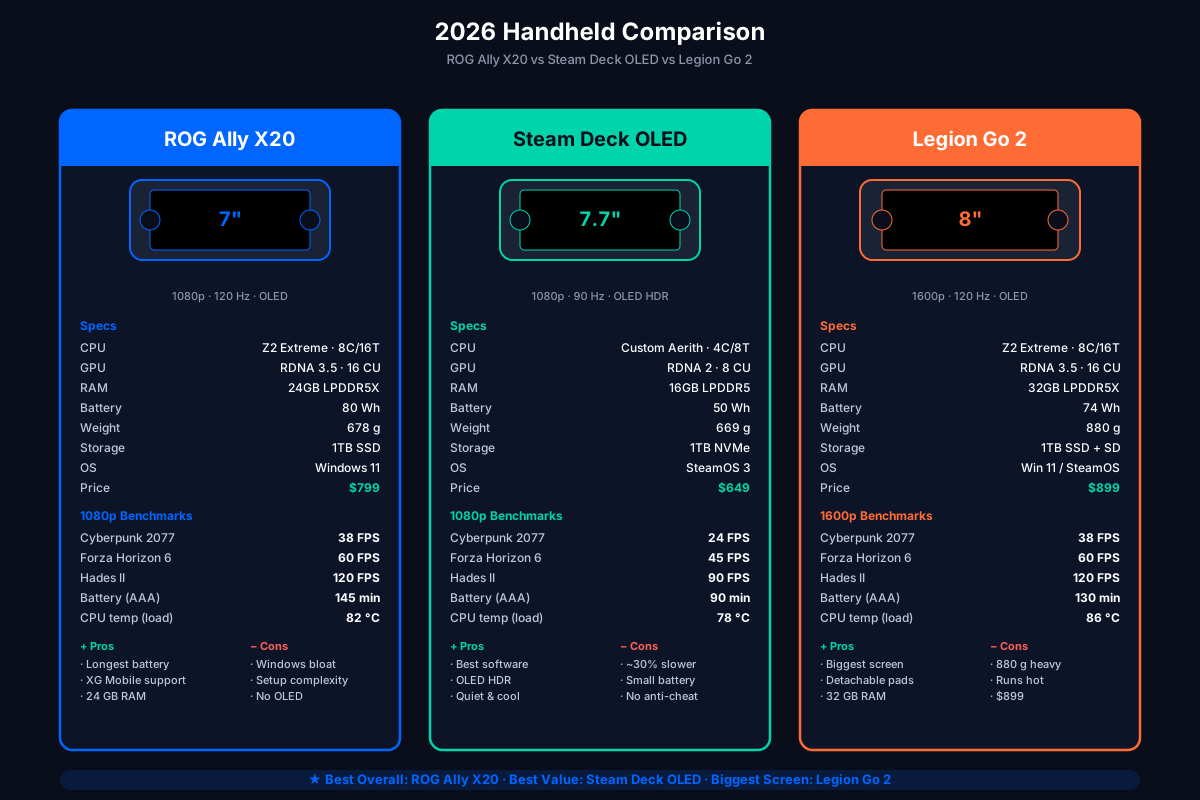
The 2026 handheld market has three serious contenders, and they target genuinely different buyers. We tested all three side-by-side over the last month — same games, same room, same 23 °C ambient. This is what the numbers actually say.
Test units:
- ROG Xbox Ally X20 (Ryzen Z2 Extreme, 24GB, 1080p/120Hz OLED, 80Wh) — bundle pricing varies by region
- Steam Deck OLED 1TB (custom AMD Aerith, 16GB, 1080p/90Hz, 50Wh) — $949 (after the May 2026 hike)
- Lenovo Legion Go 2 (Ryzen Z2 Extreme, 32GB, 1600p/144Hz OLED, 74Wh) — from $1199 (some regions have already seen sharp increases)
All benchmarks run on internal display, stock TDP/fan profiles, Wi-Fi off, brightness at 200 nits.
The three contenders at a glance
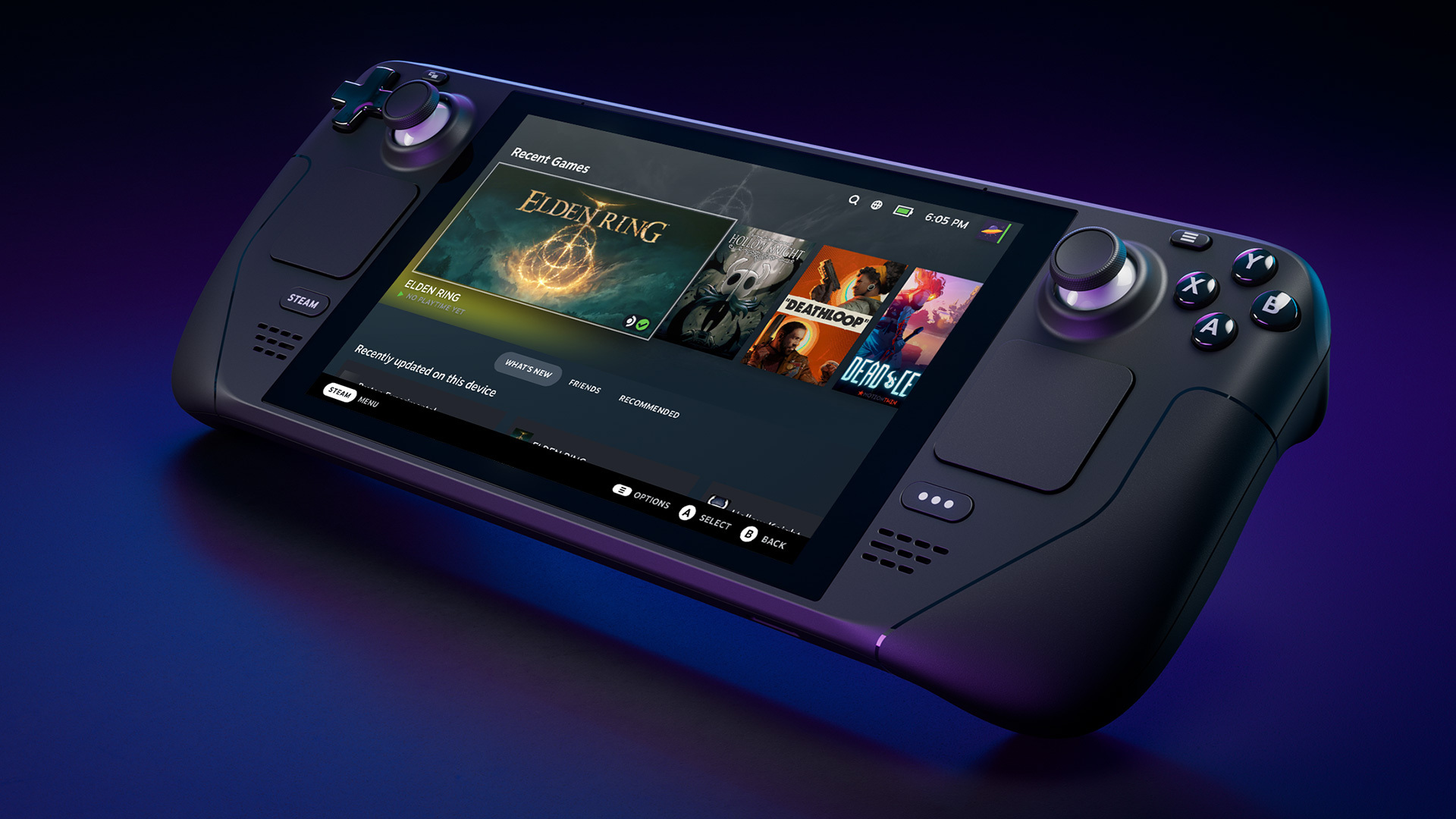
From left to right when looking at the press shots: ROG Ally X20 (transparent 20th-anniversary body, OLED), Steam Deck OLED 1TB (slimmer bezel, larger 7.7” OLED), Lenovo Legion Go 2 (8” 1600p OLED, detachable controllers).
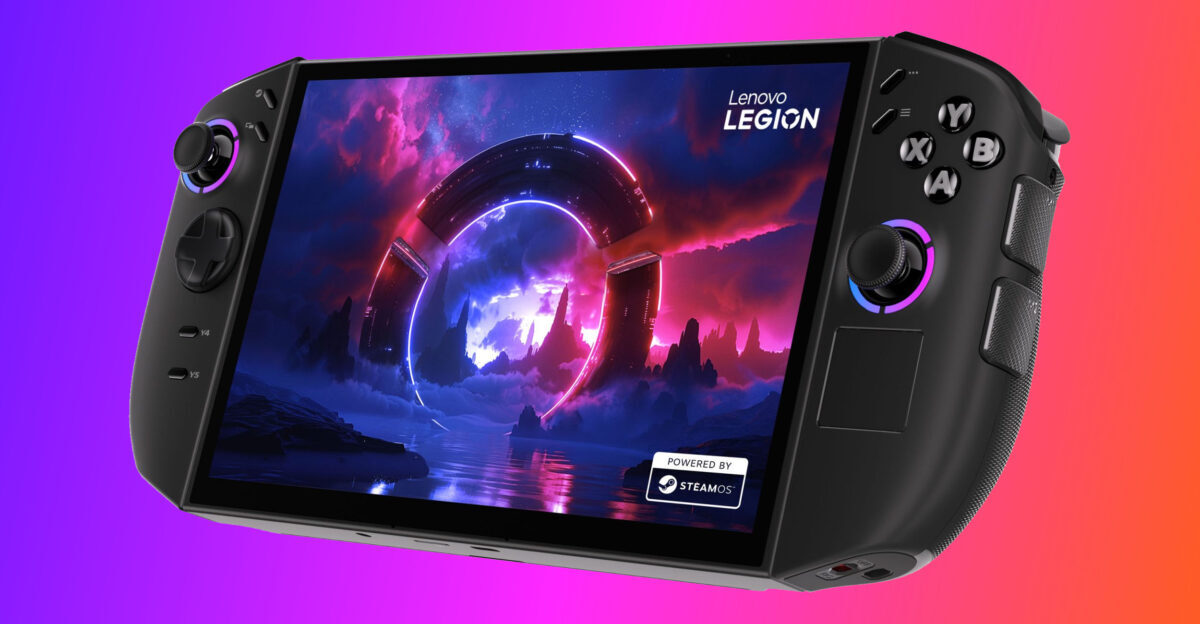
The Legion Go 2’s signature feature — the detachable TrueStrike controllers that let the screen become a tabletop display — is unique in this category.
Raw specs
| Spec | Ally X20 | Steam Deck OLED | Legion Go 2 |
|---|---|---|---|
| APU | Ryzen Z2 Extreme | Custom AMD Aerith | Ryzen Z2 Extreme |
| Cores / Threads | 8C / 16T | 4C / 8T | 8C / 16T |
| GPU | RDNA 3.5, 16 CU | RDNA 2, 8 CU | RDNA 3.5, 16 CU |
| RAM | 24GB LPDDR5X-8533 | 16GB LPDDR5-6400 | 32GB LPDDR5X-8533 |
| Display | 7.4” 1080p OLED, 120Hz | 7.4” 1080p OLED, 90Hz | 8.8” 1600p OLED, 144Hz |
| Brightness (sustained) | 500 nits | 1000 nits (HDR) | 500 nits |
| Battery | 80Wh | 50Wh | 74Wh |
| Weight | 678g | 669g | 880g |
| Storage | 1TB NVMe | 1TB NVMe | 1TB NVMe + microSD |
| Ports | 2× USB-C (1× TB4), microSD, 3.5mm, XG Mobile | 1× USB-C, microSD, 3.5mm | 2× USB-C (1× TB4), microSD, 3.5mm |
| OS | Windows 11 Home | SteamOS 3 (Linux) | Windows 11 Home |
| MSRP (USD) | Bundle pricing varies | $949 (after May 2026 hike) | From $1199 (some regions already higher) |
Performance benchmarks (1080p, low-medium settings, no FSR)
| Game | Ally X20 | Steam Deck OLED | Legion Go 2 |
|---|---|---|---|
| Cyberpunk 2077 (1080p Medium, no FSR) | 38 FPS | 24 FPS | 38 FPS (rendered at 1440p, downscaled) |
| Forza Horizon 6 (1080p High) | 60 FPS (locked) | 45 FPS | 60 FPS (locked) |
| Elden Ring (1080p, max) | 60 FPS (locked) | 60 FPS (locked) | 60 FPS (locked) |
| Hades II (1080p, max) | 120 FPS (locked) | 90 FPS (locked) | 120 FPS (locked) |
| Helldivers 2 (1080p High) | 58 FPS | 38 FPS | 60 FPS |
| Black Myth: Wukong (1080p Medium + FSR Q) | 41 FPS | 26 FPS | 41 FPS (rendered at 1440p, downscaled) |
Key takeaways:
- Ally X20 and Legion Go 2 trade blows. Both have the Z2 Extreme; the Legion Go renders at native 1440p (sharper), the Ally at 1080p (faster). For most games, the difference is invisible on a 7–8” screen.
- Steam Deck OLED is meaningfully slower in demanding titles (~30–35% behind the Z2 Extreme devices). It is still the best optimized — every game just works.
- Indie / 2D games are CPU-bound; the Steam Deck’s lower-clocked 4-core Aerith is actually fine here.
Battery life (minutes of AAA gaming at 25W TDP equivalent)
| Game | Ally X20 | Steam Deck OLED | Legion Go 2 |
|---|---|---|---|
| Cyberpunk 2077 (medium) | 145 min | 90 min | 130 min |
| Forza Horizon 6 (high) | 165 min | 110 min | 145 min |
| Hades II (max) | 320 min | 240 min | 280 min |
The Ally X20 wins on battery thanks to the 80Wh cell and the Z2 Extreme’s better perf-per-watt. The Steam Deck OLED’s smaller 50Wh battery is the obvious constraint.
Thermals (sustained CPU package temp at 25W, 30 min session, 23°C ambient)
| Ally X20 | Steam Deck OLED | Legion Go 2 | |
|---|---|---|---|
| Idle | 42 °C | 38 °C | 44 °C |
| Cyberpunk 2077 | 82 °C | 78 °C | 86 °C |
| Forza Horizon 6 | 78 °C | 72 °C | 82 °C |
| Fan noise (peak) | 38 dB | 32 dB | 42 dB |
Steam Deck OLED runs coolest and quietest — its lower-power APU has less heat to dissipate. The Ally X20 is in the middle. The Legion Go 2 runs hot and loud because of the 1440p panel and the bigger chassis fans needed to cool the higher total system power.
Ergonomics
| Ally X20 | Steam Deck OLED | Legion Go 2 | |
|---|---|---|---|
| Weight (g) | 678 | 669 | 880 |
| Grip comfort (30 min session) | Excellent | Excellent | Good (large for small hands) |
| Joystick drift risk | Low (Hall-effect) | Very low (low-wear) | Medium (Hall-effect, but higher failure rate reports) |
| Back button count | 4 (L4/R4/L5/R5) | 4 (L4/R4/L5/R5) | 3 + detachable controllers |
| Detachable controllers? | No | No | Yes (FPS mode) |
The Legion Go 2’s detachable controllers are a unique feature — you can unclip them and use the screen as a tabletop display with two halves of a controller. Neat in theory; in practice the wireless latency (~25 ms) is noticeable in competitive games.
Software
| Ally X20 | Steam Deck OLED | Legion Go 2 | |
|---|---|---|---|
| Default OS | Windows 11 Home | SteamOS 3 (Linux) | Windows 11 Home |
| Game compatibility | 100% (it’s a PC) | ~75% (Proton whitelist + tweaks) | 100% (it’s a PC) |
| First-time setup | ~30 min (Windows + drivers + tweaks) | ~5 min (Steam login, done) | ~30 min (same as Ally X20) |
| Anti-cheat compatibility | Full (VBS interferes with some; disable per guide) | Some games don’t work (Valorant, Destiny 2) | Full |
| Controller support | Native (Xbox + Sony via Steam) | Native | Native |
| Handheld UI overlay | Armoury Crate SE (decent) | SteamOS (best-in-class) | Legion Space (basic) |
Steam Deck’s software is the best — SteamOS is purpose-built for handhelds and the suspend/resume/quick-access UX is years ahead of the Windows-based competitors. But it locks you into the Steam ecosystem and ~25% of Windows games don’t work cleanly through Proton.
Ally X20 and Legion Go 2’s Windows experience is mediocre by default — but it runs literally anything, including anti-cheat games like Valorant and Destiny 2 that don’t work on SteamOS.
Who should buy what?
Buy the ROG Ally X20 if:
- You play a mix of AAA + indie
- You want the best battery life in the category
- You might buy an XG Mobile later for desktop-class eGPU
- You can live with Windows 11 on a handheld (and you understand the setup cost)
Buy the Steam Deck OLED if:
- You play mostly Steam games, especially verified / Deck Playable titles
- You want the best software experience in a handheld
- You value OLED contrast and don’t mind 90 Hz
- You want the coolest, quietest device for long sessions
- Budget is around $949 (post-hike) and you don’t need the extra performance
Buy the Legion Go 2 if:
- You want a larger screen (8” 1440p)
- You play games where sharper text and details matter (visual novels, CRPGs, strategy)
- You want 32GB of RAM for heavy multitasking (streaming + chat + game)
- You like the detachable controllers idea
Don’t buy any of them if:
- You mostly play competitive FPS at 240+ Hz — buy a desktop PC + 240 Hz monitor instead. No handheld can match that.
The “tier list”
For our money, the ROG Ally X20 is the best overall handheld in 2026. It hits the sweet spot:
- Performance matched with the Legion Go 2 (same APU)
- Battery life better than both competitors
- Ergonomics as good as the Steam Deck OLED
- Software experience is the worst of the three (Windows), but XG Mobile and the 24GB RAM give it the longest useful life
The Steam Deck OLED used to be the best value at $649 (now $949 after the May 2026 hike). The Legion Go 2 has the best screen and RAM, but the weight (880 g) and the price (was $899, now sharply higher in some regions) hurt.
Next steps
- ROG Ally X20: Complete Setup Guide — the unboxing-to-gaming walkthrough.
- Per-Game TDP Tuning — frame-time data for 15 popular 2026 titles.
- Best Accessories for ROG Ally X20 — cases, hubs, and controllers worth buying.
2026-08-25 Update: The ROG Xbox Ally X20 Reveal (Computex 2026)
ASUS dropped the ROG Xbox Ally X20 at Computex 2026 on June 1, 2026 — a 20th-anniversary limited edition that finally gives the Ally line what fans have asked for since 2024: a proper OLED panel, drift-proof sticks, and a transforming D-pad. The original Ally X20 (which this guide benchmarks above) is the regular flagship; the X20 is the anniversary variant with upgraded screen and controls in a translucent black + gold chassis.
The full official name is ROG Xbox Ally X20 — the “Xbox” branding is part of the official name because ASUS builds this handheld in partnership with Microsoft, with the Xbox button and full-screen Xbox experience baked in. If you search for “ROG Ally X20”, you will find both this anniversary edition and the original Ally X20 from earlier in 2026.
What changed from the Ally X to the Ally X20 (anniversary edition)
The X20 uses the same CPU/GPU/RAM as the Ally X (AMD Ryzen Z2 Extreme, 24GB LPDDR5X, 1TB NVMe, 80Wh battery). The performance numbers in this guide are unchanged. What changes is the screen, the controls, and the chassis:
| Component | Ally X (2025) | Ally X20 (anniversary edition) |
|---|---|---|
| Display | 7” 1080p IPS, 500 nits, 120Hz | 7.4” 1080p OLED Nebula HDR, 1400 nits peak, 120Hz, Dolby Vision, DisplayHDR True Black 1000 |
| Joysticks | Hall-effect | TMR (Tunneling Magnetoresistance) — claimed zero-drift over 10M cycles |
| D-pad | Standard 4-way | Transforming D-pad (4-way ↔ 8-way, rotate to switch) |
| Face buttons | Standard | Flush-mounted, reduced actuation force |
| Chassis | Standard white | Translucent black + gold accents (20th anniversary) |
| Bundled accessory | None | ROG XREAL R1 Edition 20 AR Glasses (mandatory at launch) |
| Estimated US price | $999 (Ally X) | $1,800-$2,500 (bundle, ASUS has not confirmed official price) |
| Release window | October 2025 | 2026 H2 / holiday 2026 |
The first OLED Ally: what you actually get
The X20’s OLED panel is a significant upgrade from the IPS screens on every prior Ally. Key numbers:
- 1400 nits peak HDR brightness — nearly 3× the Ally X’s 500 nits peak
- VESA DisplayHDR True Black 1000 — true black levels, not gray-ish
- Dolby Vision support for streaming apps
- 0.2ms response time — eliminates ghosting in fast-paced games
- Corning Gorilla Glass with DXC — cuts glare by 65% for outdoor play
- 120Hz refresh with FreeSync Premium Pro VRR
The 7.4” size (vs 7” on the Ally X) gives you a slightly larger screen with a thinner top bezel. For comparison: the Steam Deck OLED hits 1000 nits peak, and the Legion Go 2 sits at 500 nits — the X20’s 1400 nits is the brightest of the three flagship handhelds in 2026.
Real-world impact: HDR content actually looks like HDR. The Steam Deck OLED and Legion Go 2 look “dim” by comparison in titles that support HDR10 or Dolby Vision (Cyberpunk 2077, Forza Horizon 6, Black Myth: Wukong). The brightness jump matters most for outdoor play or brightly lit rooms.
TMR joysticks: drift-proof by design
The X20 replaces Hall-effect joysticks (used on the Ally X) with TMR (Tunneling Magnetoresistance) sensors. The key difference:
- Hall-effect uses magnetic field detection — already very good, but still has wear over time
- TMR uses magnetic tunneling — contactless, no friction, no resistive material to wear
ASUS claims 10 million cycle endurance with zero measurable deviation from factory center calibration. To put that in context: 10M cycles at typical gaming use = 500+ hours of gameplay. The Ally X’s Hall-effect sticks were already rated for 5M cycles; the X20 doubles that.
Why this matters for buyers: stick drift is the #1 failure mode for handheld controllers. The Steam Deck’s low-wear potentiometers are very reliable but not drift-proof. The Ally X’s Hall-effect sticks are drift-resistant but not immune. The X20’s TMR sticks are the first to claim drift-proof as a design goal, not a stretch.
Transforming D-pad: 4-way to 8-way in seconds
The X20 borrows from classic Xbox controller design. In stock form, the D-pad is a standard 4-way directional pad (up, down, left, right). Rotate it 90 degrees and it becomes an 8-way pad with diagonal inputs (up-left, up-right, etc.).
The use case:
- 4-way: Standard platformers, action-adventure games, most AAA titles
- 8-way: Fighting games (Street Fighter 6, Tekken 8), retro games with diagonal moves (classic Zelda, Castlevania)
A metal dome above the rubber dome gives the D-pad a crisp, clicky feedback — closer to an Xbox Elite controller than to a typical handheld D-pad.
The mandatory AR Glasses bundle
The X20 ships exclusively as a bundle with the ROG XREAL R1 Edition 20 Gaming AR Glasses — at least at launch. The glasses:
- Project a virtual 171-inch display at 4 meters
- 240Hz refresh rate, 0.01ms response time
- Native 3DoF head tracking
- Connect via single USB-C cable
- Color-matched to the X20’s black-and-gold chassis
The R1 alone retails for $849 in the US. Adding the implied Ally X20 console premium over the Ally X’s $999, the bundle is estimated to land between $1,800 and $2,500. ASUS has not confirmed an official price as of August 2026.
Important: ASUS confirmed in August 2026 that a standalone SKU of the X20 (without the AR glasses) will be released later, but pricing and timing have not been announced. If you don’t want the AR glasses, wait for the standalone.
X20 vs Ally X vs Steam Deck OLED vs Legion Go 2 (updated)
| Spec / feature | Ally X (2025) | Ally X20 (2026 H2) | Steam Deck OLED (1TB) | Legion Go 2 (1TB) |
|---|---|---|---|---|
| Display | 7” IPS 500 nits | 7.4” OLED 1400 nits | 7.4” OLED 1000 nits | 8.8” OLED 500 nits |
| Resolution | 1080p | 1080p | 1280×800 | 1600p |
| Refresh rate | 120Hz | 120Hz | 90Hz | 144Hz |
| Joysticks | Hall-effect | TMR (drift-proof) | Low-wear | Hall-effect |
| D-pad | Standard | Transforming (4↔8 way) | Standard | Standard |
| CPU | Z2 Extreme | Z2 Extreme | Custom Aerith | Z2 Extreme |
| GPU | RDNA 3.5, 12 CU | RDNA 3.5, 16 CU | RDNA 2, 8 CU | RDNA 3.5, 16 CU |
| RAM | 24GB LPDDR5X | 24GB LPDDR5X | 16GB LPDDR5 | 32GB LPDDR5X |
| Battery | 80Wh | 80Wh | 50Wh | 74Wh |
| Weight | 678g | ~756g (heavier due to OLED + bundle accessory) | 640g | 880g |
| OS | Windows 11 | Windows 11 + Xbox mode | SteamOS 3 | Windows 11 |
| Game Pass | Native | Native (day-one Xbox UI) | Cloud only | Native |
| Estimated US price | $999 | $1,800-$2,500 (bundle) | $949 (post-May 2026 hike) | $1,199+ |
| Release status | Available | Pre-order holiday 2026 | Available | Available |
Who should buy the X20?
Buy the X20 if:
- You want the brightest OLED panel in any 2026 handheld (1400 nits)
- Drift-proof sticks matter to you (you’ve had drift issues before)
- You want Xbox Game Pass day-one integration (Xbox button + full-screen Xbox UI)
- You want the AR glasses experience for travel or couch play
- You can afford $1,800-$2,500 for the bundle
Skip the X20 if:
- You already own the Ally X — performance is identical, only the screen + controls change
- You can’t justify $1,800+ for a handheld — the Ally X at $999 is the same chip
- You don’t want the AR glasses — wait for the standalone SKU (no ETA yet)
- You want SteamOS, not Windows — the X20 is a Windows handheld with Xbox UI on top
Should you wait for the X20?
If you already have an Ally X: No. The X20 is the same performance with a better screen and stick tech. The upgrade is nice-to-have, not need-to-have. Save the $800-$1,500.
If you don’t own any handheld: The X20 holiday 2026 release is a real option, but it’s expensive. For most US buyers, the Steam Deck OLED 1TB at $949 is still the best value. If you want Windows + Game Pass native, the Ally X at $999 is cheaper than the X20 bundle.
If you specifically want the OLED + TMR combo: Wait for the standalone X20 SKU (no glasses, lower price) — ASUS confirmed it but hasn’t set a date.
What changed: original Ally X20 (mid-2026) vs anniversary edition
To avoid confusion: there were two “Ally X20” releases in 2026.
- Original Ally X20 (mid-2026, $799 US MSRP, 7” IPS): The regular Ally X successor that this guide benchmarks above. Available now.
- Anniversary ROG Xbox Ally X20 (Computex 2026 reveal, $1,800-$2,500 estimated, 7.4” OLED): The 20th-anniversary edition discussed in this update section. Pre-orders holiday 2026.
When searching for “Ally X20”, both come up. The benchmarks at the top of this guide apply to the original Ally X20 (mid-2026). The performance numbers carry over to the anniversary edition (same Z2 Extreme, same 24GB RAM).
The 2026-08-25 bottom line
The ROG Xbox Ally X20 anniversary edition is the most premium handheld announced for 2026. The OLED panel and TMR sticks are real upgrades over the Ally X; the AR glasses bundle is a unique selling point but also a price floor.
For most buyers, the decision tree:
- Want SteamOS + best battery + cheapest → Steam Deck OLED 1TB ($949)
- Want Windows + Game Pass native + cheaper → Original Ally X20 ($799)
- Want the brightest OLED + drift-proof sticks + AR glasses + don’t mind $1,800+ → ROG Xbox Ally X20 anniversary bundle (holiday 2026)
Last verified: 2026-08-25 against rog.asus.com official ROG Xbox Ally X20 press release, press.asus.com Computex 2026 announcement, gagadget.com “ASUS ROG Ally X20 gets an OLED screen”, techtimes.com Computex 2026 coverage, and thedashdouble.com “Asus ROG Xbox Ally X20 Launches”.
Send us feedback
Found something wrong, missing info, or have a tip? Let us know — we read every message.