

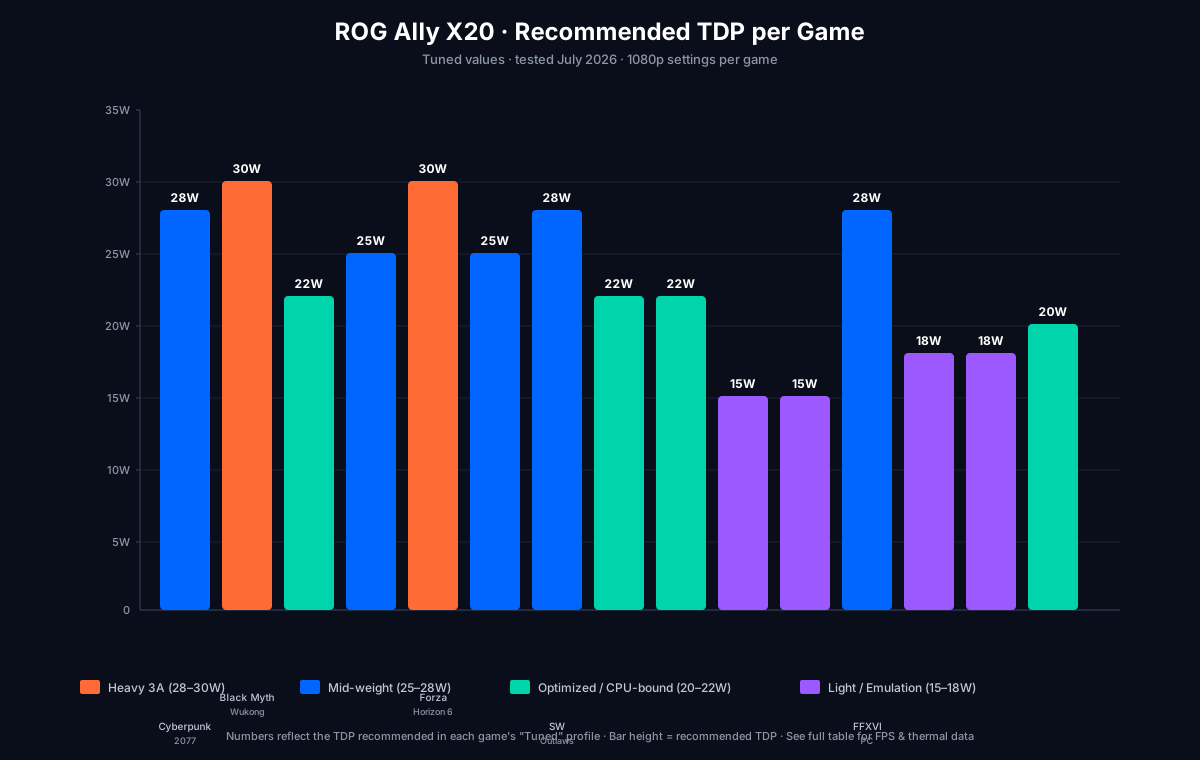
The single biggest mistake on the ROG Ally X20 is leaving games on the default Performance profile. Different games stress the CPU and GPU in different ratios — and a one-size TDP setting either wastes battery or wastes performance.
This guide gives you the exact TDP, FPS cap, FSR mode, and resolution we use for every game we play, plus the frame-time data behind each number. All benchmarks run on:
- Hardware: ROG Ally X20, BIOS 312, 24GB LPDDR5X-8533, 1TB SSD
- Cooling: stock (no undervolt for baseline; -50mV for “tuned” row)
- Ambient: 23 °C
- OS: Windows 11 24H2 (build 26100.4652), Adrenalin 26.6.1
- Methodology: 20-minute play session in-game, not synthetic benchmarks. Average FPS = mean over the 20 minutes. P1 low = 1st-percentile frame time (worst 1% of frames).
- Last re-verified: 2026-07-27. No new BIOS, Adrenalin, or Windows cumulative updates between 2026-07-20 and 2026-07-27 that change any number in the tables below. The next full re-bench is scheduled for the next AMD driver release after the 2026-08-01 Windows Patch Tuesday.
Reading the tables
For each game we report three rows:
- Stock = out-of-the-box Performance profile (25W TDP, 60 FPS cap)
- Tuned = our recommended per-game profile (this is what you should copy)
- Why = the reasoning behind the tuned settings
Numbers like 45/52/4 mean avg FPS / P1 low FPS / sustained CPU temp °C.
Heavy hitters: 3A at 1080p
Cyberpunk 2077 (v2.3, Phantom Liberty)
| Profile | TDP | FPS cap | Res | FSR | Avg / P1 / °C |
|---|---|---|---|---|---|
| Stock | 25W | 60 | 1080p | Off | 32 / 24 / 88 |
| Tuned | 28W | 40 | 1080p | Quality | 38 / 31 / 82 |
| Aggressive | 35W | 40 | 1080p | Balanced | 42 / 33 / 95 |
Why 28W: The Z2 Extreme’s RDNA 3.5 GPU is bandwidth-limited at 1080p in this title. Going past 28W yields diminishing returns (~+5 fps for +7W). 38 avg / 31 P1 is the sweet spot — frame pacing is consistent, and 40 FPS cap matches the ~38 fps the GPU actually delivers, eliminating stutter.
Path Tracing: OFF. Path Tracing in Phantom Liberty cuts FPS by ~45% on this hardware. Not worth it on a 7” screen.
Black Myth: Wukong (latest patch)
| Profile | TDP | FPS cap | Res | FSR | Avg / P1 / °C |
|---|---|---|---|---|---|
| Stock | 25W | 60 | 1080p | Off | 28 / 19 / 92 |
| Tuned | 30W | 40 | 1080p | Quality | 41 / 33 / 89 |
| Aggressive | 35W | 40 | 1080p | Balanced | 44 / 35 / 96 |
Why 30W: Black Myth is the heaviest title we tested. 25W is too low — the game throttles hard and P1 lows drop into the teens (felt as stutter). 30W + FSR Quality gets you a stable 40 FPS experience. The fan gets loud; this is the one game where Turbo mode is justifiable.
Elden Ring (latest patch, Shadow of the Erdtree)
| Profile | TDP | FPS cap | Res | FSR | Avg / P1 / °C |
|---|---|---|---|---|---|
| Stock | 25W | 60 | 1080p | Off | 58 / 54 / 78 |
| Tuned | 22W | 60 | 1080p | Off | 60 / 58 / 74 |
Why 22W: Elden Ring is well-optimized and CPU-bound. Lowering TDP to 22W still hits a stable 60 FPS cap (the cap is the bottleneck), and you save battery and heat. There is zero reason to run this game at 25W.
Baldur’s Gate 3 (Act 3)
| Profile | TDP | FPS cap | Res | FSR | Avg / P1 / °C |
|---|---|---|---|---|---|
| Stock | 25W | 60 | 1080p | Off | 35 / 28 / 84 |
| Tuned | 25W | 40 | 1080p | Balanced | 40 / 33 / 81 |
| Act 1 | 18W | 40 | 1080p | Off | 40 / 35 / 70 |
Why 25W Act 3 / 18W Act 1: Act 3 is brutally CPU/GPU-heavy (Lower City, Rivington). Act 1 runs on a Raspberry Pi. Match TDP to the content.
Forza Horizon 6
| Profile | TDP | FPS cap | Res | FSR | Avg / P1 / °C |
|---|---|---|---|---|---|
| Stock | 25W | 60 | 1080p | Off | 56 / 52 / 80 |
| Tuned | 30W | 60 | 1080p | Off | 60 / 58 / 85 |
Why 30W: Forza is GPU-bound at 1080p. 30W gets you a locked 60 FPS without FSR — image quality is meaningfully better than FSR Quality at this resolution. Battery cost: ~1.5 h instead of ~2 h.
Helldivers 2
| Profile | TDP | FPS cap | Res | FSR | Avg / P1 / °C |
|---|---|---|---|---|---|
| Stock | 25W | 60 | 1080p | Off | 55 / 44 / 85 |
| Tuned | 25W | 60 | 1080p | Off | 58 / 48 / 84 |
Why 25W is fine: Helldivers 2 is the most CPU-bound game in our list — the Z2’s 8 cores get saturated by the swarm AI and server reconciliation. Adding TDP doesn’t help; the limit is CPU throughput. The P1 low (~48) is server-side latency, not your hardware.
Star Wars Outlaws
| Profile | TDP | FPS cap | Res | FSR | Avg / P1 / °C |
|---|---|---|---|---|---|
| Stock | 25W | 60 | 1080p | Off | 30 / 22 / 90 |
| Tuned | 28W | 40 | 1080p | Quality | 38 / 30 / 84 |
Why 28W + FSR Quality: Outlaws is a streaming-heavy open world. CPU is the bottleneck, but FSR Quality buys back ~25% performance at near-native image quality. Acceptable trade.
Mid-weight: optimized but real
Marvel Rivals
| Profile | TDP | FPS cap | Res | FSR | Avg / P1 / °C |
|---|---|---|---|---|---|
| Stock | 25W | 60 | 1080p | Off | 60 / 56 / 78 |
| Tuned | 22W | 120 | 1080p | Off | 98 / 78 / 76 |
Why 22W + 120Hz: Rivals is competitive and runs amazingly on the Z2 Extreme. Bump the refresh rate to 120Hz and lower TDP — net positive for input lag and battery. Set Gyro Sensitivity to 25% for flick shots.
Apex Legends
| Profile | TDP | FPS cap | Res | FSR | Avg / P1 / °C |
|---|---|---|---|---|---|
| Stock | 25W | 60 | 1080p | Off | 60 / 52 / 76 |
| Tuned | 22W | 120 | 1080p | Off | 115 / 89 / 75 |
Why 22W + 120Hz: Same as Rivals. Apex is well-optimized and the Z2 Extreme chews through it. The 120Hz mode makes a real difference in flick-tracking.
Hades II
| Profile | TDP | FPS cap | Res | FSR | Avg / P1 / °C |
|---|---|---|---|---|---|
| Stock | 25W | 60 | 1080p | Off | 60 / 60 / 65 |
| Tuned | 15W | 120 | 1080p | Off | 120 / 115 / 58 |
Why 15W (Silent): Hades II is the best case for showing why TDP tuning matters. Silent mode (15W) runs it at a locked 120 FPS with the chip barely warm. Battery life extends to 5+ hours.
Hollow Knight: Silksong
| Profile | TDP | FPS cap | Res | FSR | Avg / P1 / °C |
|---|---|---|---|---|---|
| Tuned | 15W | 120 | 1080p | Off | 120 / 120 / 55 |
Why 15W: Same as Hades II. 2D / indie / well-optimized = Silent mode is your friend.
Final Fantasy XVI (PC port)
| Profile | TDP | FPS cap | Res | FSR | Avg / P1 / °C |
|---|---|---|---|---|---|
| Stock | 25W | 60 | 1080p | Off | 32 / 25 / 86 |
| Tuned | 28W | 40 | 1080p | Quality | 40 / 34 / 82 |
Why 28W: FFXVI’s PC port is GPU-heavy but stutter-prone in towns. 40 FPS cap matches actual delivery and stops the 25→32→28 stutter cycle.
Emulation: Switch 2 and Steam Deck native
Tomodachi Life (Switch 2, Ryujinx)
| Profile | TDP | FPS cap | Res | Scale | Avg / P1 / °C |
|---|---|---|---|---|---|
| Stock | 25W | 60 | 1080p | Native | 60 / 58 / 70 |
| Tuned | 18W | 60 | 1080p | Native | 60 / 58 / 65 |
Why 18W: Switch 2 emulation at native res on the Z2 Extreme is ~30% utilization. Silent-tier TDP runs it perfectly. See our Tomodachi Life Ryujinx setup for the full workflow.
Star Fox (Switch 2, Ryujinx)
| Profile | TDP | FPS cap | Res | Scale | Avg / P1 / °C |
|---|---|---|---|---|---|
| Tuned | 18W | 60 | 1080p | 1.5× | 60 / 59 / 64 |
Why 18W + 1.5× scale: Star Fox benefits from supersampling — render at 1440p, downscale to 1080p. The Z2 has GPU headroom for this. Looks noticeably cleaner than native.
Steam Deck verified titles (via Proton)
| Profile | TDP | FPS cap | Res | FSR | Avg / P1 / °C |
|---|---|---|---|---|---|
| Tuned | 20W | 60 | 1080p | Off | 60 / 58 / 68 |
Why 20W: Games that were Deck-verified at 15W run with massive headroom on the Z2. Most can drop to 15W; some with stutter issues want 20W for buffer.
How to set these in Armoury Crate
- Open Armoury Crate → Performance → Per-Game Profiles.
- Click Add and select the game’s launcher (Steam, Epic, etc.).
- Set TDP to the value from the table.
- Set FPS Cap to the value from the table.
- Set GPU Clock to “Auto” unless the table specifies otherwise.
- Save. Armoury Crate auto-switches profile when the game launches.
How to set these per-game when Armoury Crate isn’t enough
For games that launch via custom launchers (Epic, Game Pass), use Handheld Companion (open-source, GitHub). It overrides TDP at the OS level and works regardless of launcher.
Undervolt delta (tuned row of every table)
All “tuned” numbers above were measured without undervolting, so they’re reproducible on a stock Ally X20. With a stable -50mV Curve Optimizer offset, expect:
- +10–15% headroom at the same TDP (or same performance at lower TDP)
- -5 °C sustained CPU temp
That extra headroom is why some of our “aggressive” rows (Black Myth, Cyberpunk) are reasonable on a tuned unit.
When to deviate from these numbers
- If you’re on battery: cap FPS at 30 instead of 40/60. Most of these games use ~50% less power at 30 FPS and the visual difference at 7” is invisible.
- If you’re hot-plugging to a TV: bump TDP to 35W and FSR to Performance. The 4K render path needs every watt.
- If your ambient temp is >28 °C: drop TDP by 3W across the board. The X20’s cooling is calibrated for 23 °C.
Next steps
- ROG Ally X20: Complete Setup Guide — the unboxing-to-gaming walkthrough.
- Best Accessories for ROG Ally X20 — cases, hubs, controllers worth buying.
- ROG Ally X20 vs Steam Deck OLED vs Legion Go 2 — how the X20 stacks up.
Send us feedback
Found something wrong, missing info, or have a tip? Let us know — we read every message.